Webhooks (Legacy)
Legacy Notice: Legacy extensions are no longer actively maintained and will not receive feature updates or enhancements.
For new projects, use Webhooks.
CometChat legacy webhooks enable real-time event-driven communication with your system. They allow you to receive HTTP POST requests whenever specific events occur—such as sending a message or a user coming online. These webhooks are ideal for integrating external services like SMS, email, analytics, or auditing systems.
Webhook Endpoint Requirements
To ensure reliable delivery and security, your webhook endpoint must meet the following requirements:
- HTTPS required: Your endpoint must use
HTTPSto ensure secure data transmission. - Public accessibility: It must be accessible from the public internet.
- Support for POST requests: The endpoint must accept
HTTP POSTrequests with aContent-Typeofapplication/json. - Immediate acknowledgment: Your server must respond with an
HTTP 200 OKstatus quickly to acknowledge receipt.
Security
It is strongly recommended to use Basic Authentication to protect your webhook endpoints.
Header format
When enabled, every webhook request from CometChat will include the following HTTP header:
Authorization: Basic <Base64-encoded-credentials>
Set your username and password while configuring the webhook on the CometChat dashboard.
Legacy webhook events
Below are the legacy webhook events supported by CometChat:
| Event | Description |
|---|---|
| before_message | Triggered when a message is in-flight—just before it is processed by CometChat. |
| after_message | Triggered after a message has been successfully sent. |
| message_delivery_receipt | Triggered when a message is marked as delivered to a user. |
| message_read_receipt | Triggered when a message is marked as read by the recipient. |
| user_connection_status_change | Triggered when a user connects or disconnects from the CometChat platform. |
Manage legacy webhooks
You can manage and configure legacy webhooks in CometChat either from the dashboard UI or programmatically via Management APIs.
Option 1: Manage from the dashboard
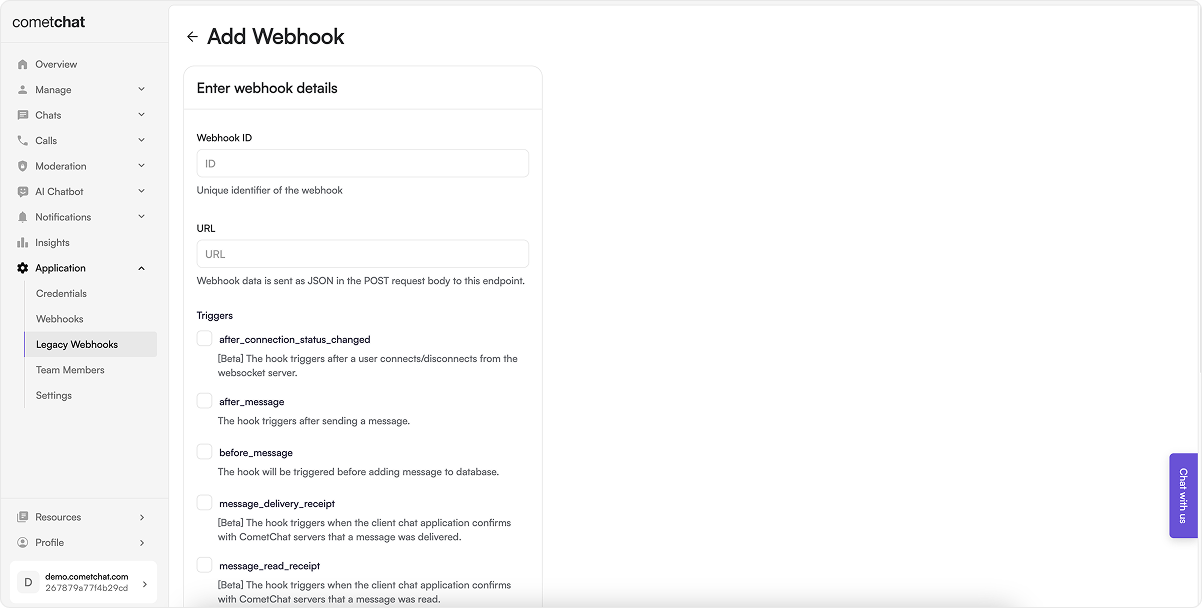
Steps
- Log in to your CometChat Dashboard and select your app.
- Go to Settings > Legacy Webhooks from the left menu.
- Click on Add New Webhook.
- Fill in the configuration:
- Webhook ID: A unique identifier for your webhook.
- URL: Endpoint where event payloads will be delivered.
- Triggers: Select the events you want to receive.
- Security: (Recommended) Enable authentication.
- Enable the webhook.
- Save the configuration.
Option 2: Manage via Management APIs
CometChat also provides Management APIs to automate webhook and trigger management.
Webhook management endpoints
| Operation | API Reference |
|---|---|
| Create a new webhook | Create Webhook |
| Update an existing webhook | Update Webhook |
| List all webhooks | List Webhooks |
| Get a webhook by ID | Get Webhook |
| Delete a webhook | Delete Webhook |
Trigger management endpoints
| Operation | API Reference |
|---|---|
| Add triggers to a webhook | Add Triggers |
| List all triggers of a webhook | List Triggers |
| Remove triggers from a webhook | Remove Triggers |
Event payloads
Message events
before_message
The endpoint will be triggered when a message is in-flight.
{
    "trigger": "before_message",
    "data": {
        "conversationId": "cometchat-uid-4_user_cometchat-uid-5",
        "sender": "cometchat-uid-5",
        "receiverType": "user",
        "receiver": "cometchat-uid-4",
        "category": "message",
        "type": "text",
        "data": {
            "text": "Hi Webhook Test",
            "entities": {
                "sender": {
                    "entity": {
                        "uid": "cometchat-uid-5",
                        "name": "John Paul",
                        "avatar": "https://assets.cometchat.io/sampleapp/v2/users/cometchat-uid-5.webp",
                        "status": "offline",
                        "role": "default"
                    },
                    "entityType": "user"
                },
                "receiver": {
                    "entity": {
                        "uid": "cometchat-uid-4",
                        "name": "Susan Marie",
                        "avatar": "https://assets.cometchat.io/sampleapp/v2/users/cometchat-uid-4.webp",
                        "status": "offline",
                        "role": "default"
                    },
                    "entityType": "user"
                }
            }
        },
        "sentAt": 1586435925,
        "updatedAt": 1586435925,
    },
    "appId": "167*****1529",
    "webhook": "send-message"
}
after_message
The endpoint will be triggered after a message is sent.
{
    "trigger": "after_message",
    "data": {
        "id": "1",
        "conversationId": "cometchat-uid-4_user_cometchat-uid-5",
        "sender": "cometchat-uid-5",
        "receiverType": "user",
        "receiver": "cometchat-uid-4",
        "category": "message",
        "type": "text",
        "data": {
            "text": "Hi Webhook Test",
            "entities": {
                "sender": {
                    "entity": {
                        "uid": "cometchat-uid-5",
                        "name": "John Paul",
                        "avatar": "https://assets.cometchat.io/sampleapp/v2/users/cometchat-uid-5.webp",
                        "status": "offline",
                        "role": "default"
                    },
                    "entityType": "user"
                },
                "receiver": {
                    "entity": {
                        "uid": "cometchat-uid-4",
                        "name": "Susan Marie",
                        "avatar": "https://assets.cometchat.io/sampleapp/v2/users/cometchat-uid-4.webp",
                        "status": "offline",
                        "role": "default"
                    },
                    "entityType": "user"
                }
            }
        },
        "sentAt": 1586435925,
        "updatedAt": 1586435925,
    },
    "appId": "167*****1529",
    "webhook": "send-message"
}
message_delivery_receipt
The endpoint will be triggered when a message is marked delivered.
{
  "trigger": "message_delivery_receipt",
  "appId": "167*****1529",
  "origin": {
      "platform": "WEBSOCKET"
  },
  "chatAPIVersion?": "3.0",
  "region?": "us|eu|other",
  "webhook": "webhook_name",
    "data": {
    "messageId": "MESSAGE_ID",
    "receiptType": "delivered",
    "deliveredAt": 1673017183,
    "messageSender":"messageSenderUID",
    "receiptSender":"receiptSenderUID",
    "receiptReceiver":"uid|guid",
    "receiverType": "user|group"
  }
}
message_read_receipt
The endpoint will be triggered when a message is marked read.
{
  "trigger": "message_read_receipt",
  "appId": "167*****1529",
  "origin": {
    "platform": "WEBSOCKET"
  },
  "chatAPIVersion?": "3.0",
  "region?": "us|eu|other",
  "webhook": "webhook_name",
    "data": {
    "messageId": "MESSAGE_ID",
    "receiptType": "read",
    "readAt": 1673017183,
    "messageSender":"messageSenderUID",
    "receiptSender":"receiptSenderUID",
    "receiptReceiver":"uid|guid",
    "receiverType": "user|group"
  }
}
User-related events
user_connection_status_change
The endpoint will be triggered when a users logs in or logs out of CometChat.
{
  "trigger": "after_connection_status_changed",
  "appId": "167*****1529",
  "origin": {
    "platform": "API|MGNT-API|WEBSOCKET|WEBRTC"
  },
  "chatAPIVersion?": "3.0",
  "region?": "us|eu|other",
  "webhook": "webhook_name",
  "data": {
    "user": {
      "uid": "uid of the user",
      "status": "online|offline",
      "status_updated": true,
      "status_updated_at": "unixtimestamp in millisec"
    },
    "event": {
      "type": "connected|disconnected",
      "at": "unixtimestamp in millisec",
      "event_for": {
        "connected_at": "unixtimestamp in millisec",
        "cometchat_device_id": "unique device id used by cometchat to identify the device(random string)",
        "session_id": "unique id to indetify the unique session of users",
        "platform": "android|ios|web"
      }
    },
    "connections": [
      {
        "connected_at": "unixtimestamp in millisec",
        "cometchat_device_id": "unique device id used by cometchat to identify the device(random string)",
        "session_id": "unique id to indetify the unique session of users",
        "platform": "android|ios|web"
      },
      {
        "connected_at": "unixtimestamp in millisec",
        "cometchat_device_id": "unique device id used by cometchat to identify the device(random string)",
        "session_id": "unique id to indetify the unique session of users",
        "platform": "android|ios|web"
      }
    ]
  }
}